
Quick start
The first launch walks you through about ten short screens. A few explain what PawTrail does; the rest set it up: your dog, three permissions, a free trial of Pro and an optional reminder for your first walk. Everything can be changed later, in the app’s Settings (the gear at the top of Home) or in the iOS Settings app under Paw Trail.
- Add your dog. Add my dog asks for a name, breed, birthday, photo and a daily distance goal. Did someone already share a dog with you? Choose Join a dog someone shares with me instead.
- Allow location so every walk is drawn on the map. PawTrail only asks for access while you use the app, and a walk keeps recording with the screen locked.
- Connect Apple Health to save walks as workouts and to see your own steps next to your dog’s walks.
- Allow notifications for planned-walk reminders, weather heads-ups and the nudge when you are back where you started.
- Try Pro for free. The trial unlocks everything for a few days. Nothing is charged automatically, and walk tracking stays free either way.
- Set a reminder for your first walk, or skip it.
Permissions
PawTrail asks for four permissions, each at the moment it needs it. Nothing else is requested: no camera, no motion data, no Bluetooth.
Change any of them in Settings › Apps › Paw Trail. Health access lives in Settings › Privacy & Security › Health › Paw Trail.
Dogs and goals
Every walk belongs to one or more dogs. Add them under My Dogs on Home (+ Add Dog) and change them later in Settings › Dogs & Workout › Edit Dogs. There is no limit on how many dogs you add, and one walk can include all of them.
Goals count distance, not minutes. The ring on each dog’s card fills with every walk that dog joined today, whoever walked it. Tap Today’s dog walks on Home for the whole day at a glance.
Recording a walk
- Tap Start Walk at the top of Home. A map opens with the place, the weather for the next hours and your dogs.
- Under Selected Dogs, use Pick Dogs to choose who is coming. All dogs start selected; at least one stays.
- Tap Start Walk. The panel counts Active Time, Distance, Average Pace and Calories, with the chance of rain and the weather coming up.
- Pause when you stop for a while. Paused time doesn’t count, and there is no auto-pause.
- Tap Stop Walk and confirm. The summary shows duration, distance, pace, calories and, on hilly walks, an elevation profile. Complete Walk saves it.
- Lock the phone and put it away. Recording continues in the background, and opening the app takes you straight back to the walk.
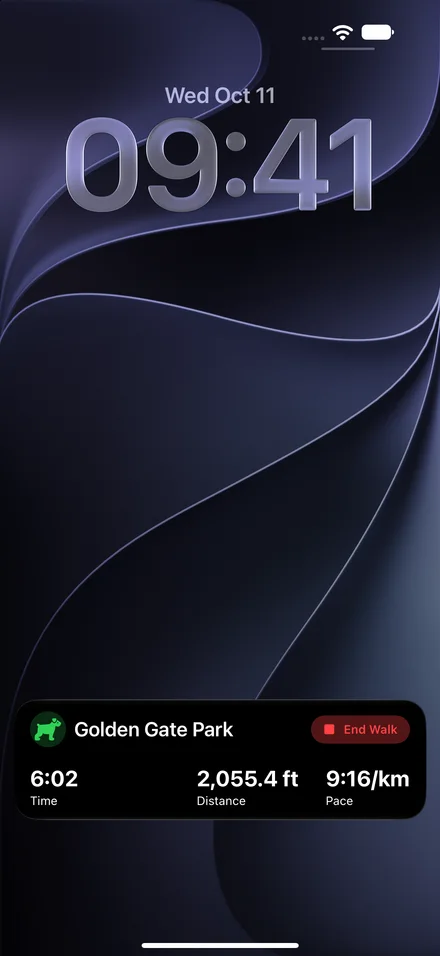
- A Live Activity on the Lock Screen and in the Dynamic Island shows time, distance, pace and the weather, with an End Walk button.
- With notifications on, coming back within 50 m of your starting point after at least 500 m sends Back at the start? so you can end the walk from the notification.
- Location jumps faster than about 36 km/h (22 mph) are ignored, so one bad GPS fix doesn’t inflate the distance.
- With Apple Health connected, the walk is saved as an Outdoor Walk workout, route included.
Reporting a danger
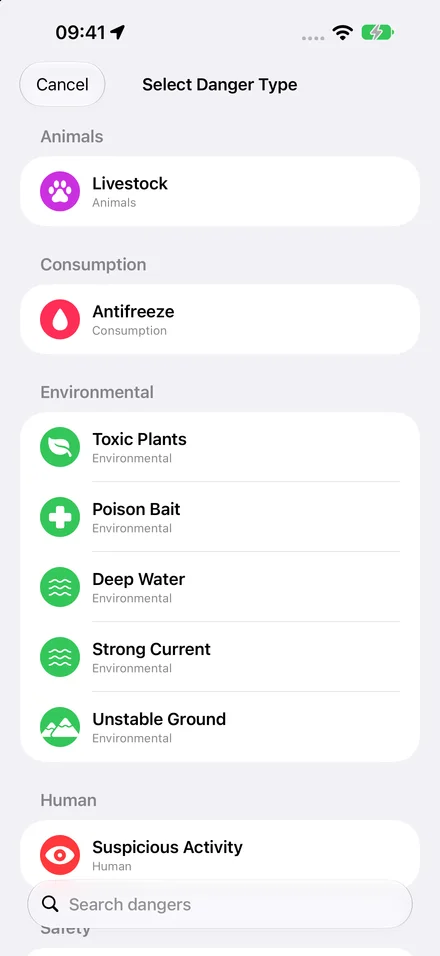
Poison bait on the path, a busy crossing, an off-lead dog that isn’t friendly? During a walk, Report Danger records it at your position.
- Tap Report Danger on the walk panel.
- Pick the Danger Type. The list is searchable.
- Check the Severity Level from 1 to 5. It is set from the type and you can change it.
- Add a note if it helps, then tap Report Danger. Danger Reported confirms it, and the walk carries on.
Walks and routes
The Walks tab keeps everything you recorded: Planned Walks, Frequent Routes and your Previous Walks, with All Walks for the full list.
Open a walk for its route on the map, the stats, the weather on the way and, with an Apple Watch, your heart rate. Photos from your library taken during the walk appear along the route. Each walk starts out named after the place; PawTrail then gives it a short title and description of its own.
Frequent routes
Walk the same way twice and it shows up as a route. A route collects every walk on it: total and average distance, average duration, the fastest walk and when you last went. The pencil on a route renames it.
Planned walks
Plan the next walk so nobody forgets it, especially in a household that shares a dog.
- Open the Walks tab, then Planned Walks › Plan Walk.
- Give it a title, pick the start time and the dogs.
- Leave Start reminder on to get a notification when it is time, then save.
- Touch and hold a planned walk to Reschedule or Cancel Walk.
The dog tag
Tap a dog’s card on Home to open its dog tag: a passport for everything you have walked together, all-time or one year at a time.
- A map with every walk, plus total distance, walking time and walk days.
- Walk Times, Top Streets and the weather you usually walk in.
- Milestones from your first marathon to the Camino de Santiago and around the Earth.
- Personal Bests: longest and farthest walk, fastest pace, biggest climb, busiest day, longest streak and peak heart rate.
- Share Dog Tag turns it into an image for Messages or social media.
A streak counts the days in a row with at least one walk. Reaching the goal isn’t required, so a short rainy-day round keeps it alive.
Walking weather
Today’s walking weather on Home sums up the day in one line. Tap it for the full outlook:
- A summary such as “Good walking weather” or “Find a dry window”.
- Your usual walks today: the forecast for the times you normally go out.
- Your routes: the weather at your three most walked routes.
- Next 24 hours with a Best time to walk badge.
- A 5-day forecast.
Forecasts come from Apple Weather and need a connection.
What counts as bad weather
Walk weather alerts
Turn on Settings › Weather notifications › Walk weather alerts and PawTrail learns when you usually walk. Once you have walked around the same time on at least three days in the last four weeks, it warns you when that time turns bad and suggests a better one: “Heat is forecast for your usual 12:00 PM walk at City Park. Try 9:00 AM instead.”
Steps
The Steps tab shows your own day: steps against your goal, distance, active energy, floors and exercise minutes. The hourly chart splits steps into With your dog and On your own, so you see how much of your day was a dog walk.
- Pick any of the last 45 days below the chart.
- The daily goal starts at 10,000 steps and goes from 1,000 to 50,000.
- Without Apple Health, steps are estimated from your walks and marked estimated. Connect switches to your real steps.
Sync and sharing
iCloud sync
PawTrail syncs through your iCloud account on its own. There is no account to create and no switch to turn on. Dogs and walks, routes included, appear on every device signed in to the same iCloud. Planned walks stay on the phone where you planned them, and frequent routes are rebuilt on each device from the synced walks. Settings › Dogs & Workout › Dog Sharing shows the status: Syncing, Not signed in or Unavailable. Without iCloud the app simply works on that phone.
Share a dog with your household
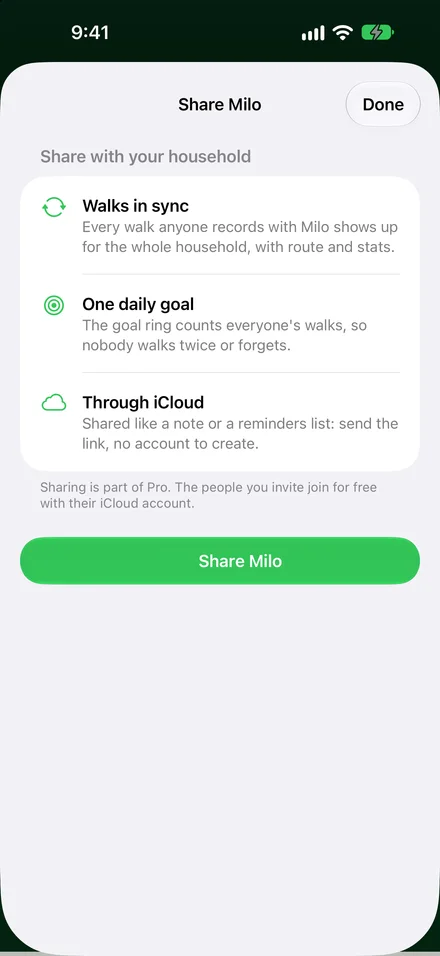
- Open Settings › Dogs & Workout › Dog Sharing, or touch and hold the dog’s card on Home and choose Share Milo….
- Tap Share Milo (with your dog’s name). iCloud’s sharing sheet opens.
- Send the link through Messages, Mail or any app, like sharing a note.
- The other person opens the link on their iPhone with PawTrail installed. Done.
Everyone in the share can record walks and edit the profile. Each walk shows who took it, and the daily goal ring counts everyone’s walks, so nobody walks twice and nobody forgets. Sharing is part of Pro; the people you invite join for free.
Join a shared dog
Tap the invitation link, or go to Home › + Add Dog › Join Shared Dog and paste it. Both phones need to be signed in to iCloud. Under Dog Sharing the owner can Invite or Remove People… and Stop Sharing; everyone else can Leave Shared Dog.
Apple Watch
The Watch app is a companion to your iPhone. The iPhone records the route, so take it along; start the walk on the iPhone and it opens on your wrist by itself.
- On the Watch: time, distance, pace, heart rate, calories and your dogs’ goals, with Pause Walk, Resume Walk and Finish Walk.
- Your heart rate also shows on the iPhone during the walk and in the walk afterwards.
- “Back at the start?” reaches your wrist too.
- Two complications for your watch face: Dog Walk and Daily Goal.
Widgets and controls
Touch and hold the Home Screen, tap Edit › Add Widget and search for Paw Trail. Controls are added the same way in Control Center, and can also go on the Lock Screen or the Action button.
During a walk, the Live Activity shows time, distance, pace, elevation and the weather on the Lock Screen and in the Dynamic Island, and ends the walk with one tap. Dog Activity also comes in every Lock Screen size.
Home Screen
- Dog Activity: today’s progress, time since the last walk, and a start button.
- Your Pack: every dog’s goal and last walk.
- Week & Streak: seven days against the goal, and the streak.
- Next Walk: the planned walk with its forecast.
- Walking Weather: is now a good time, and when is.
Control Center
- Start Walk and End Walk.
- Dog Walk: one switch that starts or ends the walk.
- Planned Walks and Walking Weather.
Siri and Shortcuts
Say these to Siri, or find them in the Shortcuts app. Siri knows the app as “Paw Trail”.
The Shortcuts app has more actions for automations: plan, reschedule or cancel a walk, get the next planned walk, the walk weather or a weekly summary, set a daily goal, report a hazard and open a walk. For example: a personal automation that starts the morning walk at 7.
- A walk started by Siri takes the dogs set in Settings › Dogs & Workout › Siri & Shortcuts › Default Dogs.
- Links like
dogwalk://walksopen a screen from other apps:home,walks,steps,planned,weather,settings.
PawTrail Pro
PawTrail is free to download, and recording walks stays free. Pro adds the long view of your dog’s life as a one-time purchase. The price for your country is shown in the app before you buy.
Free
- Recording walks, the Live Activity and Report Danger
- Today on Home, the weather card and the Steps tab
- As many dogs as you like, with daily goals
- Widgets, controls, Siri and Apple Watch
- iCloud sync, and joining a dog someone shares with you
Pro
- The dog tag with all-time stats and personal bests
- The full walk history
- Frequent routes and their stats
- Walking weather: best time, next 24 hours and 5 days
- Sharing a dog with your household
- The free trial starts when you finish the setup. Settings › In App Purchases shows how many days are left; nothing is charged when it ends.
- New phone? Restore Purchases in the same place brings Pro back for the same Apple Account. Customer Center handles everything else about your purchase.
Troubleshooting
- The route is missing or the distance looks short.
- Check Settings › Apps › Paw Trail › Location: it needs While Using the App and Precise Location on. “Your location could not be determined in time” means the phone had no GPS fix yet; step outside and start again.
- Start Walk is greyed out.
- Add a dog first. Every walk belongs to at least one dog.
- My steps say “estimated”.
- Apple Health isn’t connected. Tap Connect on the Steps tab, or allow Paw Trail in Settings › Privacy & Security › Health.
- A planned-walk reminder or “Back at the start?” never arrived.
- Both need notifications allowed for Paw Trail. Planned walks also need the Push Notifications switch in the app’s Settings. “Back at the start?” only comes after at least 500 m.
- A shared dog doesn’t show up.
- Both phones must be signed in to iCloud. “You already have access to this dog” means it is on its way and appears once iCloud has synced. If the link is no longer valid, ask for a new invitation.
- My dog’s breed isn’t in the list.
- Pick the closest breed in size and energy. The breed only sets the starting goal and the energy label, and you can move the goal freely.
- I can’t remove my dog.
- Remove Dog appears only while you have more than one dog. To start over completely, Settings › App Data › Delete App Data deletes your dogs, walks and planned walks. It can’t be undone.
- Pro is gone on my new iPhone.
- Open Settings › In App Purchases › Restore Purchases while signed in with the Apple Account you bought it with.
Still stuck? Write to contact@pawtrail.app. Fynn reads every email.